About Me

My photo
I am an MCSE in Data Management and Analytics, specializing in MS SQL Server, and an MCP in Azure. With over 19+ years of experience in the IT industry, I bring expertise in data management, Azure Cloud, Data Center Migration, Infrastructure Architecture planning, as well as Virtualization and automation. I have a deep passion for driving innovation through infrastructure automation, particularly using Terraform for efficient provisioning. If you're looking for guidance on automating your infrastructure or have questions about Azure, SQL Server, or cloud migration, feel free to reach out. I often write to capture my own experiences and insights for future reference, but I hope that sharing these experiences through my blog will help others on their journey as well. Thank you for reading!
Showing posts with label AlwaysOn. Show all posts

How to enable TDE Encryption on a database in an Availability Group

How to enable TDE Encryption on a database in an Availability Group
-----------------------------------------------------------------------------------------


Scenario


To follow the procedures outlined in this article you need:

An AlwaysOn Availability Group with at least one Primary and one Secondary replica defined.
At least one database in the Availability Group.
A Database Master Key on all replica servers (primary and secondary servers)
A Server Certificate installed on all replica instances (primary and all secondary replicas).

Primary replica -- sql95
Secondary replica -- sql94
Database Name -- TDE_DB


Step 1:Verify each replica instance has a Database Master Key (DMK) in Master – if not, create one.

use master
go
select * from sys.symmetric_keys where name = '##MS_DatabaseMasterKey##'
go

Create MASTER key encryption by password = '#-9b6#WR'

Execute below command to ensure database master key has been created.

select * from sys.symmetric_keys
where name = '##MS_DatabaseMasterKey##'
go

Step-2.Create a Server Certificate on the primary replica instance
--------------------------------------------------------------------------------
use master
go
Create certificate TDE_DB_EncryptionCert
with subject='TDE Certificate for the ADV_DB database',
EXPIRY_DATE = '20301031';
Go


-- To validate that the certificate was created, you can issue the following query:

select name,expiry_date,pvt_key_encryption_type_desc,thumbprint from sys.certificates

on sql95 & sql94 - Create  folder named CertificateFolder on D:\drive and backup the certificate file on sql95 

use master
go
backup certificate TDE_DB_EncryptionCert
to FILE = 'd:\CertificateFolder\EncryptionCert'
with private key (FILE = 'd:\CertificateFolder\TDE_DB_PrivateFile',
ENCRYPTION by password = '#-9b6#WR')

After executing above backup certificate command 2 files will get created in d:\CertificateFolder 

copy both files [EncryptionCert & TDE_DB_PrivateFile] on \\sql94\d$\CertificateFolder.

Ensure File has been copied successfully.


execute below command on secondary replica in my case it is sql94

use master
go
select * from sys.symmetric_keys where name = '##MS_DatabaseMasterkey##'
go


Create MASTER key encryption by password = '#-9b6#WR'
go
use master
go


Create Certificate TDE_DB_EncryptionCert
from file = 'd:\CertificateFolder\EncryptionCert'
with private key
  (
   File ='d:\CertificateFolder\TDE_DB_PrivateFile',
   Decryption by password ='#-9b6#WR'
   )

Verify certificate  created on secondary replica.
 please note without creating certificate, do not proceed with below step, otherwise database on secondary will come in suspect state.
----------------------------

select name,expiry_date,pvt_key_encryption_type_desc,thumbprint from sys.certificates

okay, now go  back to sql95, its primary replica and execute below command this  will create the Database Encryption Key on the Primary Replica Instance

use [ADV_DB]
go

create database encryption key
with ALGORITHM = AES_256
ENCRYPTION BY SERVER Certificate  TDE_DB_EncryptionCert
  go

Turn on Database Encryption on the Primary Replica Instance

Alter database [ADV_DB]  set encryption ON
go

you will get a message command completed successfully.

however using below command you have to check its encryption state

1 = Unencrypted

2 = Encryption in progress

3 = Encrypted

  select db_name(database_id),encryption_state,
encryptor_thumbprint,encryptor_type
from sys.dm_database_encryption_keys

it will take some time, but database will remain online.


Backout:-

In case customer says to remove the TDE on ADV_DB.

On primary replica:-

Use Master
Go
Alter database  ADV_DB Set encryption off
go
This command will complete immediately, however we have to run below command to check the encryption_state
select db_name(database_id),encryption_state,
encryptor_thumbprint,encryptor_type
from sys.dm_database_encryption_keys

Check the encryption_state, the encryption state will change from 3 to 1 and it will take time, I observed for 1 GB Database it took 1 minute.
As soon as encryption state change from 3  to 1, we have to execute below command to remove encryption key from database.

use ADV_DB
go
drop database encryption key
go

on secondary replica
----------------------
use master
go
select * from sys.certificates;
--retrieve certificate name
DROP Certificate TDE_DB_EncryptionCert;
drop master key

on primary replica
--------------------------
use master
go
select * from sys.certificates;

--retrieve certificate name

Use master
go
DROP Certificate TDE_DB_EncryptionCert;
go

drop master key

Thanks for reading. for more details refer below link:-

https://blogs.msdn.microsoft.com/alwaysonpro/2014/01/28/how-to-enable-tde-encryption-on-a-database-in-an-availability-group/


We have one more scenario here


How to add a TDE encrypted database to an Availability Group-- for this you refer this below link.

https://blogs.msdn.microsoft.com/alwaysonpro/2015/01/07/how-to-add-a-tde-encrypted-database-to-an-availability-group/ 


How do i configure AlwaysOn using certificates

How do I configure AlwaysOn using certificates in SQL Server 2016 Enterprise edition.

---------------------------------------------------------------

I have 3 nodes

  1.Win2k12-1
  2.Win2k12-1
  3.Win2k12-1

These 3 nodes are in  Windows Server 2012 R2 Cluster and Each Node has default SQL Server Instance Installed locally.


  1.Win2k12-1
  2.Win2k12-1
  3.Win2k12-1

 SQL Server service account of each node is running under local system Account and customer wants to configure AlwaysOn between these 3 replicas, but the condition is MS SQL Server instance running under the local system account.

Hence we have to create 3 endpoints on each node with  AUTHENTICATION = CERTIFICATE.

Hence Start the Work Now.
------------------------------------- 

Connect First Replica

--Win2k12-1

select @@SERVERNAME
GO
output -- -WIN2K12-1

Use master
GO
CREATE MASTER KEY ENCRYPTION BY PASSWORD = 'password@123'
GO

Use master
go
CREATE CERTIFICATE [AG_CERT_Win2k12-1_Default]
WITH SUBJECT = 'AlwaysOn certificate',
EXPIRY_DATE = '20201031'
go

BACKUP CERTIFICATE [AG_CERT_Win2k12-1_Default]
TO FILE = 'c:\Xfer\AG_CERT_Win2k12-1_Default.cer'
GO


Use master
GO
CREATE ENDPOINT [Win2k12-1]
                STATE=STARTED
                AS TCP (LISTENER_PORT = 5022, LISTENER_IP = ALL)
                FOR DATA_MIRRORING (ROLE = ALL, AUTHENTICATION = CERTIFICATE [AG_CERT_Win2k12-1_Default]
, ENCRYPTION = REQUIRED ALGORITHM AES)
GO


-->Verify ENDPOINT [WIN2K12-1]  has been created on SQl Server Instance  Win2k12-1

We have to repeat the same on another Node.

Connect 2nd Replica using SSMS
---------------------------------------------


Use master
go

CREATE MASTER KEY ENCRYPTION BY PASSWORD = 'password@123'
GO
Use master

CREATE CERTIFICATE [AG_CERT_WIN2K12-2_Default]
WITH SUBJECT = 'AlwaysOn certificate',
EXPIRY_DATE = '20201031'
go

BACKUP CERTIFICATE [AG_CERT_WIN2K12-2_Default]
TO FILE = 'c:\Xfer\AG_CERT_WIN2K12-2_Default.cer'
GO

Use master
GO

CREATE ENDPOINT [WIN2K12-2]
                STATE=STARTED
                AS TCP (LISTENER_PORT = 5022, LISTENER_IP = ALL)
                FOR DATA_MIRRORING (ROLE = ALL, AUTHENTICATION = CERTIFICATE [AG_CERT_WIN2K12-2_Default]
, ENCRYPTION = REQUIRED ALGORITHM AES)
GO


-->Verify ENDPOINT [WIN2K12-2]  has been created on SQl Server Instance  Win2k12-2

Connect  3rd replica using SSMS
Use master
go
CREATE MASTER KEY ENCRYPTION BY PASSWORD = 'password@123'
GO
Use master

CREATE CERTIFICATE [AG_CERT_WIN2K12-3_Default]
WITH SUBJECT = 'AlwaysOn certificate',
EXPIRY_DATE = '20201031'
go

BACKUP CERTIFICATE [AG_CERT_WIN2K12-3_Default]
TO FILE = 'c:\Xfer\AG_CERT_WIN2K12-3_Default.cer'
GO

Use master
GO
CREATE ENDPOINT [WIN2K12-3]
                STATE=STARTED
                AS TCP (LISTENER_PORT = 5022, LISTENER_IP = ALL)
                FOR DATA_MIRRORING (ROLE = ALL, AUTHENTICATION = CERTIFICATE [AG_CERT_WIN2K12-3_Default]
, ENCRYPTION = REQUIRED ALGORITHM AES)
GO

-->Verify ENDPOINT [WIN2K12-3]  has been created on SQl Server Instance  Win2k12-3

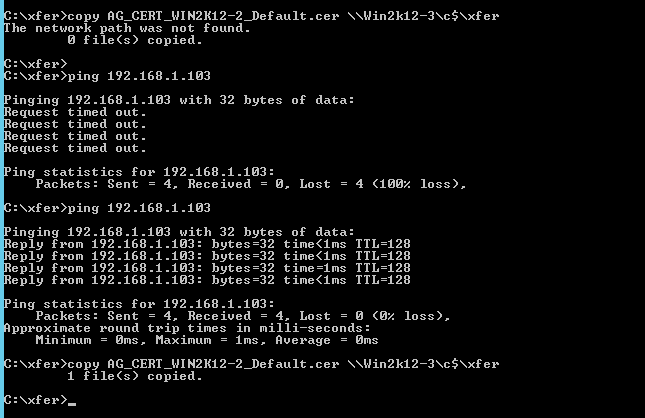
Copy Certificate Files among replicas...

 Copy Certificate File which created on Win2k12-1 to Win2k12-2 Win2k12-3

Copy Certificate File which created on Win2k12-2 to Win2k12-1 Win2k12-3


 Copy Certificate File which created on Win2k12-3 to Win2k12-1 Win2k12-2


Means each server must have all 3 certificate files of its adjuscent replicas..


Connect Win2k12-1

Create logins and create user for the same and grant on endpoint to user..

--Create login AG_NODE_Win2k12-1_Default  on Win2k12-1

USE [master]
GO
CREATE LOGIN [AG_NODE_Win2k12-1_Default] WITH PASSWORD=N'password@123', DEFAULT_DATABASE=[master], DEFAULT_LANGUAGE=[us_english], CHECK_EXPIRATION=OFF, CHECK_POLICY=OFF
GO

--Create user AG_NODE_Win2k12-1_Default  on Win2k12-1
USE [master]
GO
CREATE USER [AG_NODE_Win2k12-1_Default] FOR LOGIN [AG_NODE_Win2k12-1_Default] WITH DEFAULT_SCHEMA=[dbo]
GO
-- Grant connect on endpoint Win2k12-1 to user AG_NODE_Win2k12-1_Default

GRANT CONNECT ON ENDPOINT::[Win2k12-1] TO [AG_NODE_Win2k12-1_Default]
GO


Connect Win2k12-2

USE [master]
GO

CREATE LOGIN [AG_NODE_WIN2K12-2_Default] WITH PASSWORD=N'password@123', DEFAULT_DATABASE=[master], DEFAULT_LANGUAGE=[us_english], CHECK_EXPIRATION=OFF, CHECK_POLICY=OFF
GO
--Create user AG_NODE_WIN2K12-2_Default  on WIN2K12-2
USE [master]
GO
CREATE USER [AG_NODE_WIN2K12-2_Default] FOR LOGIN [AG_NODE_WIN2K12-2_Default] WITH DEFAULT_SCHEMA=[dbo]
GO
-- Grant connect on endpoint Win2k12-2 to user AG_NODE_Win2k12-2_Default
GRANT CONNECT ON ENDPOINT::[WIN2K12-2] TO [AG_NODE_WIN2K12-2_Default]
GO

Connect Win2k12-3

USE [master]
GO
CREATE LOGIN [AG_NODE_WIN2K12-3_Default] WITH PASSWORD=N'password@123', DEFAULT_DATABASE=[master], DEFAULT_LANGUAGE=[us_english], CHECK_EXPIRATION=OFF, CHECK_POLICY=OFF
GO

--Create user AG_NODE_WIN2K12-3_Default  on WIN2K12-3
USE [master]
GO
CREATE USER [AG_NODE_WIN2K12-3_Default] FOR LOGIN [AG_NODE_WIN2K12-3_Default] WITH DEFAULT_SCHEMA=[dbo]
GO

-- Grant connect on endpoint Win2k12-3 to user AG_NODE_Win2k12-3_Default
GRANT CONNECT ON ENDPOINT::[WIN2K12-3] TO [AG_NODE_WIN2K12-3_Default]
GO


Connect First Replica

--  Connect Win2k12-1

In win2k12-1 restore certificates of win2k12-2 and win2k12-3 with login of win2k12-1 which we created earlier..

 Associate the certificate AG_CERT_Win2k12-2_Default.cer of  machine Win2k12-2 with the user AG_NODE_Win2k12-1_Default

Use master
go
CREATE CERTIFICATE [AG_CERT_Win2k12-2_Default] AUTHORIZATION [AG_NODE_Win2k12-1_Default]
FROM FILE ='c:\Xfer\AG_CERT_Win2k12-2_Default.cer'
GO


Associate the certificate AG_CERT_Win2k12-3_Default.cer of  machine Win2k12-3 with the user IL1DBTS-US-AP07_login

Use master
go
CREATE CERTIFICATE [AG_CERT_Win2k12-3_Default] AUTHORIZATION [AG_NODE_Win2k12-1_Default]
FROM FILE ='c:\Xfer\AG_CERT_Win2k12-3_Default.cer'
GO

Repeat the same for other 2 replicas
-------------------------------------------

--on Win2k12-2

On  Win2k12-2 restore certificates of Win2k12-1 and Win2k12-3 with login of Win2k12-2

Use master
go

CREATE CERTIFICATE [AG_CERT_Win2k12-1_Default] AUTHORIZATION [AG_NODE_Win2k12-2_Default]
FROM FILE ='c:\Xfer\AG_CERT_Win2k12-1_Default.cer'
GO

Use master
go
CREATE CERTIFICATE [AG_CERT_Win2k12-3_Default] AUTHORIZATION [AG_NODE_Win2k12-2_Default]
FROM FILE ='c:\Xfer\AG_CERT_Win2k12-3_Default.cer'
GO

--on Win2k12-3

on Win2k12-3 Restore\Associate certificates of Win2k12-1 and Win2k12-2 with login of Win2k12-3


Use master
go
CREATE CERTIFICATE [AG_CERT_Win2k12-1_Default] AUTHORIZATION [AG_NODE_Win2k12-3_Default]
FROM FILE ='c:\Xfer\AG_CERT_Win2k12-1_Default.cer'
GO

Use master
go
CREATE CERTIFICATE [AG_CERT_Win2k12-2_Default] AUTHORIZATION [AG_NODE_Win2k12-3_Default]
FROM FILE ='c:\Xfer\AG_CERT_Win2k12-2_Default.cer'
GO

Now try to telnet ports among each other machine on port 5022.. 

Endpoint port will get telnet and you should be able to configure AlwaysOn among these nodes.

Now take full Backup of databases from primary replica and restore to all secondary replicas in norecvery mode.
Take log Backup of databases from primary replica and restore to all secondary replicas in norecvery mode.

Script to configure AlwaysOn..

--- YOU MUST EXECUTE THE FOLLOWING SCRIPT IN SQLCMD MODE.
:Connect WIN2K12-1
IF (SELECT state FROM sys.endpoints WHERE name = N'Win2k12-1') <> 0
BEGIN
 ALTER ENDPOINT [Win2k12-1] STATE = STARTED
END

GO
use [master]
GO
GRANT CONNECT ON ENDPOINT::[Win2k12-1] TO [NT Service\MSSQLSERVER]
GO
:Connect WIN2K12-1
IF EXISTS(SELECT * FROM sys.server_event_sessions WHERE name='AlwaysOn_health')
BEGIN
  ALTER EVENT SESSION [AlwaysOn_health] ON SERVER WITH (STARTUP_STATE=ON);
END
IF NOT EXISTS(SELECT * FROM sys.dm_xe_sessions WHERE name='AlwaysOn_health')
BEGIN
  ALTER EVENT SESSION [AlwaysOn_health] ON SERVER STATE=START;
END
GO

:Connect WIN2K12-2,1433
IF (SELECT state FROM sys.endpoints WHERE name = N'WIN2K12-2') <> 0
BEGIN
 ALTER ENDPOINT [WIN2K12-2] STATE = STARTED
END

GO
use [master]
GO
GRANT CONNECT ON ENDPOINT::[WIN2K12-2] TO [NT Service\MSSQLSERVER]
GO
:Connect WIN2K12-2,1433
IF EXISTS(SELECT * FROM sys.server_event_sessions WHERE name='AlwaysOn_health')
BEGIN
  ALTER EVENT SESSION [AlwaysOn_health] ON SERVER WITH (STARTUP_STATE=ON);
END
IF NOT EXISTS(SELECT * FROM sys.dm_xe_sessions WHERE name='AlwaysOn_health')
BEGIN
  ALTER EVENT SESSION [AlwaysOn_health] ON SERVER STATE=START;
END
GO

:Connect WIN2K12-3,1433
IF (SELECT state FROM sys.endpoints WHERE name = N'WIN2K12-3') <> 0
BEGIN
 ALTER ENDPOINT [WIN2K12-3] STATE = STARTED
END

GO
use [master]
GO
GRANT CONNECT ON ENDPOINT::[WIN2K12-3] TO [NT Service\MSSQLSERVER]
GO
:Connect WIN2K12-3,1433
IF EXISTS(SELECT * FROM sys.server_event_sessions WHERE name='AlwaysOn_health')
BEGIN
  ALTER EVENT SESSION [AlwaysOn_health] ON SERVER WITH (STARTUP_STATE=ON);
END
IF NOT EXISTS(SELECT * FROM sys.dm_xe_sessions WHERE name='AlwaysOn_health')
BEGIN
  ALTER EVENT SESSION [AlwaysOn_health] ON SERVER STATE=START;
END
GO

:Connect WIN2K12-1
USE [master]
GO
CREATE AVAILABILITY GROUP [Win2k12AG]
WITH (AUTOMATED_BACKUP_PREFERENCE = SECONDARY,
DB_FAILOVER = ON,
DTC_SUPPORT = NONE)
FOR DATABASE [AdventureWorks2014]
REPLICA ON N'WIN2K12-1' WITH (ENDPOINT_URL = N'TCP://Win2k12-1.Adven.com:5022', FAILOVER_MODE = AUTOMATIC, AVAILABILITY_MODE = SYNCHRONOUS_COMMIT, BACKUP_PRIORITY = 50, SECONDARY_ROLE(ALLOW_CONNECTIONS = ALL)),
 N'WIN2K12-2' WITH (ENDPOINT_URL = N'TCP://Win2k12-2.Adven.com:5022', FAILOVER_MODE = AUTOMATIC, AVAILABILITY_MODE = SYNCHRONOUS_COMMIT, BACKUP_PRIORITY = 50, SECONDARY_ROLE(ALLOW_CONNECTIONS = ALL)),
 N'WIN2K12-3' WITH (ENDPOINT_URL = N'TCP://Win2k12-3.Adven.com:5022', FAILOVER_MODE = AUTOMATIC, AVAILABILITY_MODE = SYNCHRONOUS_COMMIT, BACKUP_PRIORITY = 50, SECONDARY_ROLE(ALLOW_CONNECTIONS = ALL));
GO
:Connect WIN2K12-2,1433
ALTER AVAILABILITY GROUP [Win2k12AG] JOIN;
GO
:Connect WIN2K12-3,1433
ALTER AVAILABILITY GROUP [Win2k12AG] JOIN;
GO
:Connect WIN2K12-2,1433

-- Wait for the replica to start communicating
begin try
declare @conn bit
declare @count int
declare @replica_id uniqueidentifier
declare @group_id uniqueidentifier
set @conn = 0
set @count = 30 -- wait for 5 minutes
if (serverproperty('IsHadrEnabled') = 1)
 and (isnull((select member_state from master.sys.dm_hadr_cluster_members where upper(member_name COLLATE Latin1_General_CI_AS) = upper(cast(serverproperty('ComputerNamePhysicalNetBIOS') as nvarchar(256)) COLLATE Latin1_General_CI_AS)), 0) <> 0)
 and (isnull((select state from master.sys.database_mirroring_endpoints), 1) = 0)
begin
    select @group_id = ags.group_id from master.sys.availability_groups as ags where name = N'Win2k12AG'
 select @replica_id = replicas.replica_id from master.sys.availability_replicas as replicas where upper(replicas.replica_server_name COLLATE Latin1_General_CI_AS) = upper(@@SERVERNAME COLLATE Latin1_General_CI_AS) and group_id = @group_id
 while @conn <> 1 and @count > 0
 begin
  set @conn = isnull((select connected_state from master.sys.dm_hadr_availability_replica_states as states where states.replica_id = @replica_id), 1)
  if @conn = 1
  begin
   -- exit loop when the replica is connected, or if the query cannot find the replica status
   break
  end
  waitfor delay '00:00:10'
  set @count = @count - 1
 end
end
end try
begin catch
 -- If the wait loop fails, do not stop execution of the alter database statement
end catch
ALTER DATABASE [AdventureWorks2014] SET HADR AVAILABILITY GROUP = [Win2k12AG];
GO
:Connect WIN2K12-3,1433

-- Wait for the replica to start communicating
begin try
declare @conn bit
declare @count int
declare @replica_id uniqueidentifier
declare @group_id uniqueidentifier
set @conn = 0
set @count = 30 -- wait for 5 minutes
if (serverproperty('IsHadrEnabled') = 1)
 and (isnull((select member_state from master.sys.dm_hadr_cluster_members where upper(member_name COLLATE Latin1_General_CI_AS) = upper(cast(serverproperty('ComputerNamePhysicalNetBIOS') as nvarchar(256)) COLLATE Latin1_General_CI_AS)), 0) <> 0)
 and (isnull((select state from master.sys.database_mirroring_endpoints), 1) = 0)
begin
    select @group_id = ags.group_id from master.sys.availability_groups as ags where name = N'Win2k12AG'
 select @replica_id = replicas.replica_id from master.sys.availability_replicas as replicas where upper(replicas.replica_server_name COLLATE Latin1_General_CI_AS) = upper(@@SERVERNAME COLLATE Latin1_General_CI_AS) and group_id = @group_id
 while @conn <> 1 and @count > 0
 begin
  set @conn = isnull((select connected_state from master.sys.dm_hadr_availability_replica_states as states where states.replica_id = @replica_id), 1)
  if @conn = 1
  begin
   -- exit loop when the replica is connected, or if the query cannot find the replica status
   break
  end
  waitfor delay '00:00:10'
  set @count = @count - 1
 end
end
end try
begin catch
 -- If the wait loop fails, do not stop execution of the alter database statement
end catch
ALTER DATABASE [AdventureWorks2014] SET HADR AVAILABILITY GROUP = [Win2k12AG];
GO

GO


--Configure Listener

From Primary replica
--------------------------

USE [master]
GO
ALTER AVAILABILITY GROUP [Win2k12AG]
ADD LISTENER N'Win2k12AGListen' (
WITH IP
((N'192.168.1.105', N'255.255.255.0')
)
, PORT=1433);
GO

AlwaysOn Configuration completed successfully...


Thanks for Reading...

Step by step how to refresh Databases In AlwaysOn if TDE is also enabled


Assume customer comes and say they want to refresh database companytest database from companyprod database.

Prerequsite:-

An existing AlwaysOn Availability Group with at least one Primary[Win2k12-2] and one Secondary replica [Win2k12-3] instance.
A TDE encrypted database on the same instance as the primary replica, online and accessible.
A Database Master Key on all replica servers hosting the availability group (the primary will already have one since it has a TDE encrypted database).

Here:-
Win2k12-2 = Primary replica
Win2k12-3 = Secondary replica
MyTestAg = Availability group Name
\\PDOMAINDC\AlwaysOnBackup = Backup shared folder..


and Task here is to refresh CompanyTest database from CompanyProd Both Databases have TDE already Enabled.


The broad steps which we need to carry out to meet our requirement is as:-
    • Remove a Secondary Database from Availability Group
    • Remove the specified primary database and the corresponding secondary databases from the availability group.
    • Drop database from a secondary replica

    • Take full backup of companyprod from primary replica and restore into compantest database on primary replica with norecovery
    • Take Transaction log backup of companyprod from primary replica and restore into compantest database on primary replica with recovery.
    • On primary replica we specify user database ‘compnaytest’ as we want to add to the availability group.
    • Again, take Fullbackup of companytest from primary replica with copy_only option.
    • Restore companytest to secondary replica in norecovery mode
    • Take T-log backup of companytest from primary replica
    • Restore T-log backup of companytest to secondary replica in norecovery mode
    • Join the secondary database ‘companytest’ to the local secondary replica.

  • Remove a Secondary Database from Availability Group

: connect WIN2k12-3


Use master
Go
ALTER DATABASE [companytest] SET HADR OFF;
GO


  • Remove the specified primary database and the corresponding secondary databases from the availability group.

: connect Win2k12-2


USE [master]
GO
ALTER AVAILABILITY GROUP [MyTestAg] REMOVE DATABASE [companytest];
GO


: connect WIN2k12-3


drop database companytest
GO


: Connect WIN2K12-2


BACKUP DATABASE [companyprod] TO  DISK = N'\\PDOMAINDC\AlwaysOnBackup\companyprod_full.bak' WITH  COPY_ONLY, FORMAT, INIT, COMPRESSION,  STATS = 1
GO


RESTORE DATABASE [companytest] FROM  DISK = N'\\PDOMAINDC\AlwaysOnBackup\companyprod_full.bak' WITH  RECOVERY,replace
, NOUNLOAD,  STATS = 5,
move N'AdventureWorks2014_Data' to N'C:\Program Files\Microsoft SQL Server\MSSQL12.MSSQLSERVER\MSSQL\DATA\companytest.mdf',
move N'AdventureWorks2014_Log' to N'C:\Program Files\Microsoft SQL Server\MSSQL12.MSSQLSERVER\MSSQL\DATA\companytest_log.ldf'
GO


: Connect WIN2K12-2

USE [master]
GO
ALTER AVAILABILITY GROUP [MyTestAg] ADD DATABASE [companytest];
GO


: Connect WIN2K12-2
BACKUP DATABASE [companytest] TO  DISK = N'\\PDOMAINDC\AlwaysOnBackup\companytest_full_Again.bak' WITH  COPY_ONLY, FORMAT, INIT, SKIP, REWIND, NOUNLOAD, COMPRESSION,  STATS = 5
GO


: Connect WIN2K12-3
RESTORE DATABASE [companytest] FROM  DISK = N'\\PDOMAINDC\AlwaysOnBackup\companytest_full_Again.bak' WITH  NORECOVERY, NOUNLOAD,  STATS = 5
GO


: Connect WIN2K12-2
BACKUP LOG [companytest] TO  DISK = N'\\PDOMAINDC\AlwaysOnBackup\companytest_Again_1.trn' WITH NOFORMAT, INIT, NOSKIP, REWIND, NOUNLOAD, COMPRESSION,  STATS = 5
GO


: Connect WIN2K12-3
RESTORE LOG [companytest] FROM  DISK = N'\\PDOMAINDC\AlwaysOnBackup\companytest_Again_1.trn' WITH  NORECOVERY,  NOUNLOAD,  STATS = 5
GO


-- Wait for the replica to start communicating

: Connect WIN2K12-3

begin try
declare @conn bit
declare @count int
declare @replica_id uniqueidentifier
declare @group_id uniqueidentifier
set @conn = 0
set @count = 30 -- wait for 5 minutes
if (serverproperty('IsHadrEnabled') = 1)
    and (isnull((select member_state from master.sys.dm_hadr_cluster_members where upper(member_name COLLATE Latin1_General_CI_AS) = upper(cast(serverproperty('ComputerNamePhysicalNetBIOS') as nvarchar(256)) COLLATE Latin1_General_CI_AS)), 0) <> 0)
    and (isnull((select state from master.sys.database_mirroring_endpoints), 1) = 0)
begin
    select @group_id = ags.group_id from master.sys.availability_groups as ags where name = N'MyTestAg'
    select @replica_id = replicas.replica_id from master.sys.availability_replicas as replicas where upper(replicas.replica_server_name COLLATE Latin1_General_CI_AS) = upper(@@SERVERNAME COLLATE Latin1_General_CI_AS) and group_id = @group_id
    while @conn <> 1 and @count > 0
    begin
        set @conn = isnull((select connected_state from master.sys.dm_hadr_availability_replica_states as states where states.replica_id = @replica_id), 1)
        if @conn = 1
        begin
            -- exit loop when the replica is connected, or if the query cannot find the replica status
            break
        end
        waitfor delay '00:00:10'
        set @count = @count - 1
    end
end
end try
begin catch
    -- If the wait loop fails, do not stop the execution of the alter database statement
end catch

Join the secondary database ‘companytest’ to the local secondary replica.

ALTER DATABASE [companytest] SET HADR AVAILABILITY GROUP = [MyTestAg];
GO


Thanks for reading..


and
 How to add a TDE encrypted database to an Availability Group

 refer this hyper link..