About Me

My photo
I am an MCSE in Data Management and Analytics, specializing in MS SQL Server, and an MCP in Azure. With over 19+ years of experience in the IT industry, I bring expertise in data management, Azure Cloud, Data Center Migration, Infrastructure Architecture planning, as well as Virtualization and automation. I have a deep passion for driving innovation through infrastructure automation, particularly using Terraform for efficient provisioning. If you're looking for guidance on automating your infrastructure or have questions about Azure, SQL Server, or cloud migration, feel free to reach out. I often write to capture my own experiences and insights for future reference, but I hope that sharing these experiences through my blog will help others on their journey as well. Thank you for reading!
Showing posts with label Level 16. Show all posts

Failed to bring availability group 'agadven' online. The operation timed out. Verify that the local Windows Server Failover Clustering (WSFC) node is online


Issue:- While configuring AlwaysOn in Azure Environment, sometime users get below error.


Problem:-


Disconnecting connection from NODE2...
Connecting to NODE2...
Disconnecting connection from NODE2...
Connecting to NODE1...
Msg 41131, Level 16, State 0, Line 70
Failed to bring availability group 'agadven' online.  The operation timed out. Verify that the local Windows Server Failover Clustering (WSFC) node is online. Then verify that the availability group resource exists in the WSFC cluster. If the problem persists, you might need to drop the availability group and create it again.
Msg 41152, Level 16, State 2, Line 70
Failed to create availability group 'agadven'.  The operation encountered SQL Server error 41131 and has been rolled back.  Check the SQL Server error log for more details.  When the cause of the error has been resolved, retry CREATE AVAILABILITY GROUP command.
Disconnecting connection from NODE1...
Connecting to NODE2...
Msg 41044, Level 16, State 1, Line 82
Availability group name to ID map entry for availability group 'agadven' cannot be found in the Windows Server Failover Clustering (WSFC) store.  The availability group name may be incorrect, or the availability group may not exist in this Windows Server Failover Cluster.  Verify the availability group exists and that the availability group name is correct and then retry the operation.
Msg 41158, Level 16, State 3, Line 82
Failed to join local availability replica to availability group 'agadven'.  The operation encountered SQL Server error 41044 and has been rolled back.  Check the SQL Server error log for more details.  When the cause of the error has been resolved, retry the ALTER AVAILABILITY GROUP JOIN command.
Disconnecting connection from NODE2...


Resolution:-

To resolve this issue, use one of the following methods.

Method 1: Use manual steps

if [NT AUTHORITY\SYSTEM] is not present in SQL server Logins Folder

Create a logon in SQL Server for the [NT AUTHORITY\SYSTEM] account on each SQL Server computer that hosts a replica in your availability group.

Grant the [NT AUTHORITY\SYSTEM] account the following server-level permissions:
Alter Any Availability Group
Connect SQL
View server state

Note Make sure that no other permissions are granted to the account.

Method 2: Use script

To create the [NT AUTHORITY\SYSTEM] account, run the following in a query window:

USE [master]
GO
CREATE LOGIN [NT AUTHORITY\SYSTEM] FROM WINDOWS WITH DEFAULT_DATABASE=[master]
GO

To grant the permissions to the [NT AUTHORITY\SYSTEM] account, run the following in a query window:

GRANT ALTER ANY AVAILABILITY GROUP TO [NT AUTHORITY\SYSTEM]
GO
GRANT CONNECT SQL TO [NT AUTHORITY\SYSTEM]
GO
GRANT VIEW SERVER STATE TO [NT AUTHORITY\SYSTEM]


After doing this, my issue resolved

Thanks for reading.

UPDATE STATISTICS failed because statistics cannot be updated on a columnstore index.UPDATE STATISTICS is valid only when used with the STATS_STREAM option.


Error:-

If we have clustered column store index on a table and when we update statistics with traditional command like
UPDATE Statistics <TableName> (Statisticsname ) with FULLSCAN

-->The update statistics command gets fail with the below-highlighted message


Msg 35337, Level 16, State 1, Line 23

UPDATE STATISTICS failed because statistics cannot be updated on a columnstore index.  UPDATE STATISTICS is valid only when used with the STATS_STREAM option.


use AdventureWork2014
go

CREATE CLUSTERED columnstore INDEX [PK_ErrorLog_ErrorLogID] ON [dbo].[Errorlog] WITH (DROP_EXISTING = OFF)

then Execute below command to retrieve

SELECT
OBJECT_NAME([sp].[object_id]) AS "Table",
[sp].[stats_id] AS "Statistic ID",
[s].[name] AS "Statistic",
[sp].[last_updated] AS "Last Updated",
[sp].[rows],
[sp].[rows_sampled],
[sp].[unfiltered_rows],
[sp].[modification_counter] AS "Modifications",
'UPDATE Statistics ' + OBJECT_NAME([sp].[object_id]) + ' ( ' + [s].[name] + ')' + ' with SAMPLE 30 percent'
FROM [sys].[stats] AS [s]
OUTER APPLY sys.dm_db_stats_properties ([s].[object_id],[s].[stats_id]) AS [sp]
WHERE [s].[object_id] = OBJECT_ID(N'[dbo].[Errorlog]');

go
execute the command 

UPDATE Statistics ErrorLog ( PK_ErrorLog_ErrorLogID) with SAMPLE 30 percent

you will get below error.

Msg 35337, Level 16, State 1, Line 23
UPDATE STATISTICS failed because statistics cannot be updated on a columnstore index.  UPDATE STATISTICS is valid only when used with the STATS_STREAM option.


Resolution:-

In order to resolve this issue:-

We have to export that table statistics to a temp table. That table looks like this. It matches the output of DBCC SHOW_STATISTICS WITH HISTOGRAM.  


if exist drop # table

1.
drop table #stats_with_stream
go

2. Create a  #table #stats_with_stream

  CREATE TABLE #stats_with_stream
(
       stream VARBINARY(MAX) NOT NULL
       , rows INT NOT NULL
       , pages INT NOT NULL
);
go

3. Insert stream, rows and number of pages to  #stats_with_stream

INSERT INTO #stats_with_stream --SELECT * FROM #stats_with_stream
EXEC ('DBCC SHOW_STATISTICS (N''Adventureworks2014.dbo.[Errorlog]'',PK_ErrorLog_ErrorLogID )
  WITH STATS_STREAM,NO_INFOMSGS');

4. retrieve and check #stats_with_stream

select * from #stats_with_stream

5. The final step is to create the SQL that updates the statistics of our target table, and then execute it.

  DECLARE @sql NVARCHAR(MAX);
SET @sql = (SELECT 'UPDATE STATISTICS Adventureworks2014.dbo.Errorlog(PK_ErrorLog_ErrorLogID) WITH
STATS_STREAM = 0x' + CAST('' AS XML).value('xs:hexBinary(sql:column("stream"))',
'NVARCHAR(MAX)') FROM #stats_with_stream );


--PRINT (@sql);
EXEC (@sql);


Hence in this way, we can update statistics of that index which has clustered index.

PS:- For nonclustered column store index, we do not have to do anything.


Thanks for Reading..   


The Windows Server Failover Clustering (WSFC) resource control API returned error code 5057. The WSFC service may not be running or may not be accessible in its current state, or the specified arguments are invalid.

Error:-

While creating an  Availability Group Listener I received this error
Msg 41009, Level 16, State 7, Line 1
The Windows Server Failover Clustering (WSFC) resource control API returned error code 5057.
The WSFC service may not be running or may not be accessible in its current state, or the specified arguments are invalid.  For information about this error code, see "System Error Codes" in the Windows Development documentation.


Adding Replica of Multisubnet gives error operation encountered SQL Server error 19456 and has been rolled back.


Issue:-

None of the IP addresses configured for the availability group listener can be hosted by the server 'Node3SQL03'. Either configure a public cluster network on which one of the specified IP addresses can be hosted, or add another listener IP address which can be hosted on a public cluster network for this server.
Failed to join local availability replica to availability group 'SQL0040DAG01'.  The operation encountered SQL Server error 19456 and has been rolled back.  Check the SQL Server error log for more details.  When the cause of the error has been resolved, retry the ALTER AVAILABILITY GROUP JOIN command. (Microsoft SQL Server, Error: 19456)

Failed to join local availability replica to availability group 'SQL0040DAG01'.  The operation encountered SQL Server error 19456 and has been rolled back.  Check the SQL Server error log for more details.  When the cause of the error has been resolved, retry the ALTER AVAILABILITY GROUP JOIN command.

Disconnecting connection from Node3SQL03...

Issue:-
Servers in Multi-subnet clustering with AlwaysOn Configured in Multi-subnet Envirnment
DataCenter-1
IP
DataCenter-2
MgmtIP
Node1SQL01
192.168.1.10
Node3SQL03
192.168.2.12
Node2SQL02
192.168.1.11
Node4SQL04
192.168.2.13

and existing Availability group is -- SQL0040DAG01

The requirement is to add 3rd replica{Node3SQL03} in existing AG which belongs to a different data center and hence in the different network.


I encountered below error, while adding Availability Replica in AG in Multi-subnet environment:


None of the IP addresses configured for the availability group listener can be hosted by the server 'Node3SQL03'. Either configure a public cluster network on which one of the specified IP addresses can be hosted, or add another listener IP address which can be hosted on a public cluster network for this server.

Failed to join local availability replica to availability group 'SQL0040DAG01'. The operation encountered SQL Server error 19456 and has been rolled back. Check the SQL Server error log for more details. When the cause of the error has been resolved, retry the ALTER AVAILABILITY GROUP JOIN command. (Microsoft SQL Server, Error: 19456)


Failed to join local availability replica to availability group 'SQL0040DAG01'. The operation encountered SQL Server error 19456 and has been rolled back. Check the SQL Server error log for more details. When the cause of the error has been resolved, retry the ALTER AVAILABILITY GROUP JOIN command.

Disconnecting connection from Node3SQL03...

And


Connecting to Node3SQL03...

Msg 41158, Level 16, State 3, Line 2

Failed to join local availability replica to availability group 'SQL0040DAG01'. The operation encountered SQL Server error 41106 and has been rolled back. Check the SQL Server error log for more details. When the cause of the error has been resolved, retry the ALTER AVAILABILITY GROUP JOIN command.

Disconnecting connection from Node3SQL03...

Reason of this issue:-


For this AG, which is  implemented in multi-subnet cluster, existing listener was configured only with  one of the subnet IPaddress [192.168.1.*], which belongs to datacenter 1.

 This error message popped up while configuring the replicas in another subnet, and the reason for error message was that the listener was configured with only one subnet IP address.
Hence there is a need to add IP address for another subnet in this existing listener.

Resolution:-

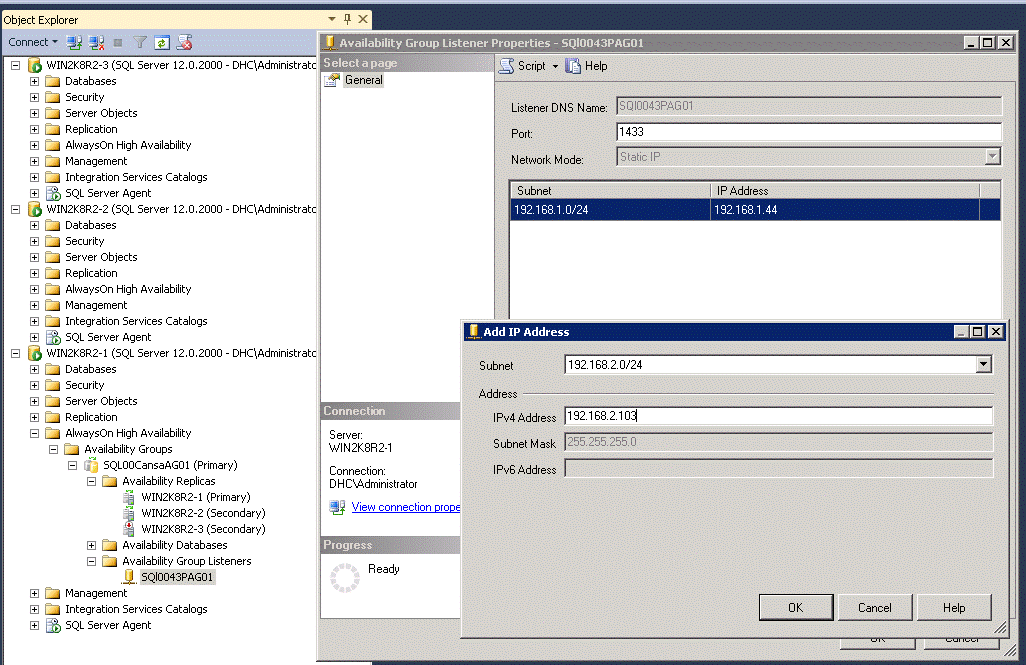
So once we will configure listener with  IPaddress of second subnet, as shown in the figure -1, we will be able to successfully add replica of the secondary subnet’s [192.168.2.*].
To do this, I clicked on existing listener SQL0040DAG01 –> Property --> and added an IP address of 192.168.2.14(Datacenter2)


Then Click OK.

Now try to add 3rd replica on existing AG, the issue will get resolve.

Hope this will help to someone who has this issue.

Thanks for reading... 


There is already a master key in the database. Please drop it before performing this statement.Drop Master key plus Understanding encryption hierarchy..


Issue: -There is already a master key in the database. Please drop it before performing this statement.

------------------------------------------------------------------------------------------------------------------------

USE Master ;
GO
CREATE MASTER KEY ENCRYPTION BY PASSWORD = 'Singapore@123';
GO


Issue:-
Msg 15578, Level 16, State 1, Line 1
There is already a master key in the database. Please drop it before performing this statement.

hence Executing this command

let's see what happen

USE Master;
go
 drop Master Key
Go

Msg 15580, Level 16, State 1, Line 1
Cannot drop master key because certificate 'TDECert' is encrypted by it.

it looks we have TDECert Certificate which is encrypted by this master key, Analogy is you have kept your certificate in a Wood drawer. your certificate is protected with this wooden drawer, hence you can not drop this master key.

hence the next step would be to drop the certificate How?

USE Master;
go
drop certificate TDECert
go

In my case this statement executed successfully.

hence you can now drop master key.

Use master;
go
 drop master key
go

 -- This Command will execute successfully.. if previous drop certificate has ----executed successfully then..
it means your certificate is not bound to any database encryption key.

otherwise you will get error..

Msg 3716, Level 16, State 15, Line 1
The certificate ‘TDECert’ cannot be dropped because it is bound to one or more database encryption key.

This message is very clear and it states that the certificate cannot be dropped as its related to the database Encryption key.

then Execute this command
use Master
Go
     Drop database Encryption key
Go;
it will give error

or 
we will get error:-
Msg 33102, Level 16, State 7, Line 1

Cannot encrypt a system database. Database encryption operations cannot be performed for 'master', 'model', 'tempdb', 'msdb', or 'resource' databases.

this message is very loud & clear that we can not execute this command in system database.

Msg 33105, Level 16, State 1, Line 1
Cannot drop the database encryption key because it is currently in use. Database encryption needs to be turned off to be able to drop the database encryption key.

it looks we have to turn off encryption before dropping database encryption key..

hence search for which database encryption is enabled and for that database you can turn Encryption off.

/*This Script will give you result output for which database TDE is enabled.
---------------------------------------------------------------------------------------------------------
USE master;
GO

SELECT
    db.name,
    db.is_encrypted,
    dm.encryption_state,
    dm.percent_complete,
    dm.key_algorithm,
    dm.key_length
FROM
    sys.databases db
    LEFT OUTER JOIN sys.dm_database_encryption_keys dm
        ON db.database_id = dm.database_id;

GO
----------------------------------------------------------------------------------------------------------------
Use Master
Go
Alter database  TestDatabase Set encryption off
Go
  -- Command completed successfully.

Now we can successfully drop encryption key for that database

use TestDatabase 
  go
 drop database encryption key
  go


Now you  can drop in below order.. 

 1. Encryption key  -- DROP Database encryption key -- on user database 
 2. Certificate   -- DROP Certificate TDECert -- on master database
 3. master key -- DROP Master Key -- on master database

Use Testdatabase
Go
DROP Database encryption key;
go

use master
go
select * from sys.certificates;
--get certificate which you have to drop

DROP Certificate TDECert;

DROP Master Key;

In this way, we can clear our test/Lab  environment. 

Thank you very much for reading this and if time allows leave Comment.

Extra Reading :- http://www.sqlservercentral.com/articles/Encryption/108750/

The operation timed out. Verify that the local Windows Server Failover Clustering (WSFC) node is online. Msg 41131, Level 16, State 0, Line 3

Failed to bring availability group 'SQL00CansaAG01' online. The operation timed out. Verify that the local Windows Server Failover Clustering (WSFC) node is online. Msg 41131, Level 16, State 0, Line 3

---------------------------------------------------------------------------------------------------------------------